Organization of a Driver
![[Previous]](prev.gif) |
![[Contents]](contents.gif) |
![[Index]](keyword_index.gif) |
![[Next]](next.gif) |
Organization of a Driver
This chapter includes:
The QNX audio system and driver
Before discussing the organization of the driver you're about to write, it's useful to first discuss the organization of the QNX audio system. Let's consider an audio application sending data to an audio card. The QNX architecture for this is:
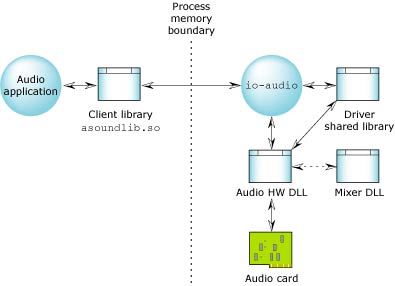
How the driver fits into the QNX audio system.
Everything to the right of the Process memory boundary is the audio driver. To complete the audio driver for your audio card, you have to build only the Audio HW DLL.
- Audio application
- Produces PCM data and then makes a series of QNX Audio API calls to send this data to the Audio card. For more information, see the QNX Audio Developer's Guide.
- Client library (asoundlib.so)
- Translates the API calls into messages and sends them to the driver process
across the fully memory-protected boundary.
In addition to this, the client library has a series of plugins that the application can use to convert its data to and from various formats. This means the driver has to support only native audio formats. The client library plugins can be used to make any necessary conversions. The mechanism by which this is done is somewhat complicated and outside the scope of this document, but it does allow for a simplified driver interface.
- io-audio
- The main controller for all audio drivers. It's designed to support multiple audio cards simultaneously. Its primary functions are mounting and unmounting audio cards, and directing inbound messages to the correct card. For information about starting io-audio, see the QNX Utilities Reference.
- Driver shared library
- Provides a series of subroutines that the io-audio and the Audio HW DLL modules need. Due to the nature of our dynamically linked library system, the driver shared library doesn't need to be a separate file. Instead it's actually linked into the io-audio module, but it's still useful to think of it as a separate piece that any module can reach.
- Audio hardware DLL
- This is the piece you're developing. It's the bridge between the hardware and the rest of the audio system. Thanks to the architecture, the amount of code inside this module is quite small. The audio HW DLL module is produced as a DLL so that io-audio can load and unload it at runtime so as to reduce its memory footprint.
- Mixer DLL
- If the card has a standard codec, you can use a mixer DLL to further reduce the work required in writing the audio HW DLL. For more information, see the Supported Codecs appendix.
DDK source code
When you install the DDK package, the source is put into a directory under the ddk_install_dir/ddk-audio directory. Currently, the directory structure for the Audio DDK looks like this:
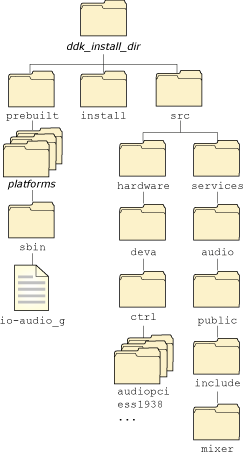
Directory structure for the Audio DDK.
For example, the ddk_working_dir for the previous example would be ~/my_DDKs/audio/.
Writing an Audio HW DLL
This section describes some of the basics of writing an Audio HW DLL, including:
Opaque data types
The API for the Audio DDK involves some structures that aren't defined in the scope of this DDK; their contents are only known to the io-audio layer. You typically just need to save pointers to them and pass the pointers to the functions that need them.
Here's a list of the opaque data types:
- ado_card_t
- ado_dswitch_t
- ado_mixer_delement
- ado_mixer_dgroup_t
- ado_mixer_t
- ado_pcm_subchn_mixer_t
- ado_pcm_subchn_t
- ado_pcm_t
The ado prefix to these names stands for audio.
Custom data types
Your Audio HW DLL might need to keep some internal data for its own use. The Audio DDK lets you define context-sensitive data for your hardware as well as the mixers.
To make the API more flexible (and readable), the Audio DDK uses these types that you can define as you wish:
- HW_CONTEXT_T
- Data you want to associate with the hardware.
- MIXER_CONTEXT_T
- Data you want to associate with a mixer.
By default, these types are empty structures. Use a #define directive to set these types as appropriate before including any of the Audio DDK header files. For example:
#define HW_CONTEXT_T    my_hw_context_t
#define MIXER_CONTEXT_T my_mixer_context_t
If you wish, you can even define HW_CONTEXT_T and MIXER_CONTEXT_T to be the same type.
 |
The MIXER_CONTEXT_T is stored as part of the ado_mixer_t structure. If you need to access the mixer context, you need to call ado_mixer_get_context() because ado_mixer_t is an opaque data type. |
ctrl_init()
Your Audio HW DLL must provide an entry point called ctrl_init(), of type ado_ctrl_dll_init_t. When io-audio loads your Audio HW DLL, it calls this function. The prototype is:
int32_t ctrl_init( HW_CONTEXT_T **hw_context,
                   ado_card_t *card,
                   char *args )
The arguments are:
- hw_context
- A location where your ctrl_init() function can store a pointer to a context-specific state structure for the card. You can define HW_CONTEXT_T to be whatever structure you want; by default, it's defined to be struct hw_context.
- card
- A pointer to an internal card structure, ado_card_t.
This structure isn't defined in the scope of this DDK; its contents are only known to the io-audio layer. You'll need to save this pointer to pass to some functions, such as ado_mixer_create(), that your Audio HW DLL might call.
- args
- Any command-line arguments that were part of the io-audio or mount command (for more information, see the QNX Utilities Reference).
The first job of this initialization code is to allocate its context-specific state structure. You can allocate the hardware context by calling ado_calloc() or ado_malloc().
Next, you need to verify that the hardware is present in the system. How you do this depends on your driver; in some cases, it isn't possible:
- If your card is a PCI device, the easiest way to attach to the card is by
calling
ado_pci_device().
This function even parses the driver arguments to find the right card to
attach to.
The ado_pci_device() function returns a pointer to a ado_pci structure that describes a selected PCI card. Keep a copy of this pointer in your hardware context.
- If your hardware is on another bus, you have to check the arguments, using getsubopt() (see the QNX Library Reference) to determine what hardware your driver should try to use.
You should set the short and long names that audio applications will use to identify your card's type and the specific instance of the hardware; call ado_card_set_shortname() and ado_card_set_longname().
In addition to the above, the initialization depends on what features your Audio HW DLL supports:
- If you're writing your own audio mixer, you need to create it and its elements. See "Writing an analog mixer" in the Handling Analog Audio Data chapter.
- If you're using a standard audio mixer, you need to open its DLL. See "Using a standard mixer DLL" in the Handling Analog Audio Data chapter.
- If you want to support digital audio, you need to create a Pulse Code Modulation (PCM) device. See the Handling PCM Audio Data chapter.
If the initialization is successful, ctrl_init() should return 0. If an error occurs, ctrl_init() should return -1; in this case, io-audio unmounts the card.
ctrl_destroy()
Your Audio HW DLL must provide an entry point called ctrl_destroy(), of type ado_ctrl_dll_destroy_t. The io-audio manager calls ctrl_destroy() whenever the card is unmounted. The prototype is:
int32_t ctrl_destroy( HW_CONTEXT_T **hw_context );
This function undoes whatever you did in your ctrl_init() function. Typically, your ctrl_destroy() function:
- disconnects from the PCI device by calling ado_pci_release()
- frees the memory allocated for the hardware context
- does any other cleanup required.
If the cleanup is successful, ctrl_destroy() should return 0. If an error occurs, ctrl_destroy() should return -1.
Debugging an audio driver
The Audio DDK uses several constants to turn debugging messages on and off. The main one is ADO_DEBUG.
The standard Audio DDK makefiles define ADO_DEBUG if you've defined DEBUG in your environment. If you compile your driver with debugging options, ADO_DEBUG is defined as well to help you debug your logic.
If ADO_DEBUG is defined, several things happen:
- Error messages and warnings generated by your calls to ado_error() and ado_debug() are printed on standard output as well as being sent to the system logger, slogger. In nondebug mode, they're sent only to slogger. For more information about the system logger, see the QNX Utilities Reference.
- Full memory accounting is provided for all the ado_*
memory functions:
You can call ado_memory_dump() to get a full listing of active memory. In nondebug mode, these memory functions are defined to be the standard C library functions.
If you've set ADO_DEBUG, you can also define the following macros to get specialized debug output:
- ADO_MUTEX_DEBUG -- used by ado_mutex_destroy(), ado_mutex_init(), ado_mutex_lock(), and ado_mutex_unlock().
- ADO_RWLOCK_DEBUG -- used by ado_rwlock_destroy(), ado_rwlock_init(), ado_rwlock_rdlock(), ado_rwlock_unlock(), and ado_rwlock_wrlock().
If you define these macros, you'll see a message whenever a lock is changed. You'll probably need to define them only if you encounter a locking problem.
|
If you've compiled your driver with ADO_DEBUG on, the driver won't run under the shipped io-audio, because the debugging code makes io-audio bigger, which can be a problem for embedded systems. If you want to run your driver in debug mode, use the io_audio_g that's shipped with the DDK. |
|
|
|
|