Files and Streams
![[Previous]](prev.gif) |
![[Contents]](contents.gif) |
![[Next]](next.gif) |
Files and Streams
Text and Binary Streams · Controlling Streams · Stream States
A program communicates with the target environment by reading and writing files (ordered sequences of bytes). A file can be, for example, a data set that you can read and write repeatedly (such as a disk file), a stream of bytes generated by a program (such as a pipeline), or a stream of bytes received from or sent to a peripheral device (such as the keyboard or display). The latter two are interactive files. Files are typically the principal means by which to interact with a program.
You manipulate all these kinds of files in much the same way
-- by calling library functions. You include the standard header
<stdio.h> to declare most of these functions.
Before you can perform many of the operations on a file, the
file must be
opened.
Opening a file associates it with a
stream, a data structure within
the Standard C library that glosses over many differences
among files of various kinds.
The library maintains the state of each stream in an object of type
FILE.
The target environment opens three files prior to
program startup.
You can open a file by calling the library function
fopen with
two arguments. The first argument is a
filename, a
multibyte string
that the target environment uses to identify which file you
want to read or write. The second argument is a
C string that specifies:
- whether you intend to read data from the file or write data to it or both
- whether you intend to generate new contents for the file (or create a file if it did not previously exist) or leave the existing contents in place
- whether writes to a file can alter existing contents or should only append bytes at the end of the file
- whether you want to manipulate a text stream or a binary stream
Text and Binary Streams
A
text stream consists of one or more
lines of text
that can be written to a text-oriented display so that they can
be read. When reading from a text stream, the program reads an
NL (newline) at the end of each line.
When writing to a text stream, the program writes an
NL to signal the end of a line. To match
differing conventions among target environments for representing text
in files, the library functions can alter the number and representations
of characters transmitted between the program and a text stream.
Thus, positioning within a text stream is limited.
You can obtain the current
file-position indicator
by calling fgetpos or
ftell.
You can position a text stream at a position obtained this way,
or at the beginning or end of the stream, by calling
fsetpos or
fseek.
Any other change of position might well be not supported.
For maximum portability, the program should not write:
- empty files
spacecharacters at the end of a line- partial lines (by omitting the
NLat the end of a file) - characters other than the printable characters,
NL, andHT(horizontal tab)
If you follow these rules, the sequence of characters you read from a text stream (either as byte or multibyte characters) will match the sequence of characters you wrote to the text stream when you created the file. Otherwise, the library functions can remove a file you create if the file is empty when you close it. Or they can alter or delete characters you write to the file.
A binary stream consists of one or more bytes of arbitrary information. You can write the value stored in an arbitrary object to a (byte-oriented) binary stream and read exactly what was stored in the object when you wrote it. The library functions do not alter the bytes you transmit between the program and a binary stream. They can, however, append an arbitrary number of null bytes to the file that you write with a binary stream. The program must deal with these additional null bytes at the end of any binary stream.
Thus, positioning within a binary stream is well defined,
except for positioning relative to the end of the stream.
You can obtain and alter the current
file-position indicator
the same as for a text stream.
Moreover, the offsets used by
ftell and
fseek
count bytes from the beginning of the stream (which is byte zero),
so integer arithmetic on these offsets yields predictable results.
A byte stream treats a file as a sequence of bytes. Within the program, the stream looks like the same sequence of bytes, except for the possible alterations described above.
Controlling Streams
fopen
returns the address of an object of type
FILE.
You use this address as the stream argument to several library
functions to perform various operations on an open file. For a byte
stream, all input takes place as if each character is read by calling
fgetc,
and all output takes place as if each character is written by calling
fputc.
You can
close a file by calling
fclose,
after which the address of the
FILE object is invalid.
A FILE
object stores the state of a stream, including:
- an error indicator -- set nonzero by a function that encounters a read or write error
- an end-of-file indicator -- set nonzero by a function that encounters the end of the file while reading
- a file-position indicator -- specifies the next byte in the stream to read or write, if the file can support positioning requests
- a stream state -- specifies whether the stream will accept reads and/or writes
- a file buffer -- specifies the address and size of an array object that library functions can use to improve the performance of read and write operations to the stream
Do not alter any value stored in a
FILE object or in
a file buffer that you specify for use with that object.
You cannot copy a
FILE object
and portably use the address of the copy
as a stream argument to a library function.
Stream States
The valid states, and state transitions, for a stream are shown in the diagram.
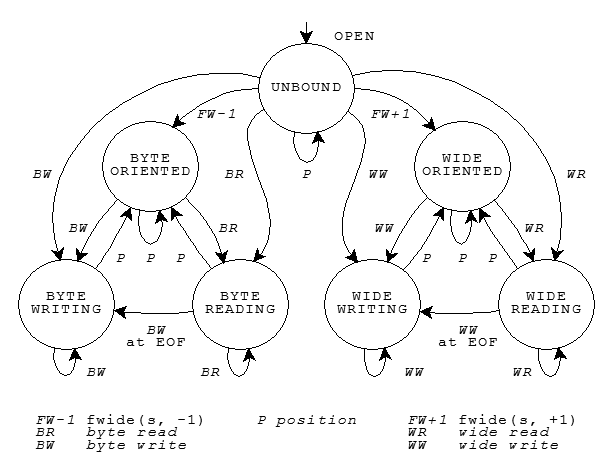
Each of the circles denotes a stable
state. Each of the lines denotes a transition that can occur as the
result of a function call that operates on the stream.
(The ``wide'' states are never entered in the Embedded C++ library.)
Three groups of functions can cause state transitions.
All are declared in
<stdio.h>:
- the byte read functions --
fgetc,fgets,fread,fscanf,getc,getchar,gets,scanf, andungetc - the byte write functions --
fprintf,fputc,fputs,fwrite,printf,putc,putchar,puts,vfprintf, andvprintf - the position functions --
fflush,fseek,fsetpos, andrewind
The state diagram shows that you must call one of the position functions between most write and read operations:
- You cannot call a read function if the last operation on the stream was a write.
- You cannot call a write function if the last operation on the stream was a read, unless that read operation set the end-of-file indicator.
Finally, the state diagram shows that a position operation never decreases the number of valid function calls that can follow.
See also the Table of Contents and the Index.
Copyright © 1989-2002 by P.J. Plauger and Jim Brodie. All rights reserved.
|
|
|