Using the Photon Chinese Supplement
![[Previous]](prev.gif) |
![[Contents]](contents.gif) |
![[Next]](next.gif) |
Using the Photon Chinese Supplement
This guide includes:
Chinese fonts
After installing the Photon Chinese Supplement, the following scalable Chinese fonts should be installed and ready to use on your system:
- Bitstream SB Gothic HK Uni (Traditional and Hong Kong)
- Bitstream SB Gothic SC Uni (Simplified GB2312-80)
- Bitstream SB Gothic TC Uni (Traditional Big5)
 |
The Photon Chinese Supplement provides Unicode fonts. Photon doesn't use code pages. |
Chinese input method (cpim)
The Photon Chinese Supplement includes an input method utility (cpim) that you can use to enter Chinese characters in Photon.
To run the cpim utility:
- Open a pterm window and enter the following command:
cpim &
A small window appears:
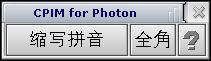
- Click the "?" button -- this launches the Helpviewer with instructions on using the cpim utility.
|
You may notice a Helpviewer error message in the pterm where you started cpim -- please ignore the message. |
To enable and disable cpim, press Ctrl-Space.
If you want to control cpim from an application, start it with the -h option to suppress the graphical user interface. You'll need to use PtFepCmd() to control the FEP; see the Photon Library Reference.
|
|
|