phfind
![[Previous]](../prev.gif) |
![[Contents]](../contents.gif) |
![[Index]](../keyword_index.gif) |
![[Next]](../next.gif) |
phfind
File search utility
Syntax:
phfind [options]
Runs on:
Neutrino
Options:
- -c
- Case-sensitive pattern match. The default is case-insensitive.
- -npattern
- The name or pattern to find.
- -r
- Don't recursively search subdirectories. The default is to recurse.
- -R
- Recursively search symbolic links. The default is not to recurse.
- -S
- Single-threaded operation. The default is multi-threaded. Setting this option saves a thread, but it may reduce responsiveness of phfind on a slow filesystem.
- -t options
- The types of files to look for. Combine one or more of:
- a -- all (the default setting)
- b -- block special
- c -- character special
- d -- directories
- f -- regular files
- l -- symbolic links
- n -- named special
- p -- FIFOs (pipes)
- s -- sockets
- -x position[%][r]
- The x coordinate of the upper-left corner of the window, in pixels, or as a percentage of screen width if % is specified. If r is specified, the coordinate is relative to the current console.
- -y position[%][r]
- The y coordinate of the upper-left corner of the window, in pixels, or as a percentage of screen height if % is specified. If r is specified, the coordinate is relative to the current console.
Description:
This utility starts a graphical file search application. You must be running Photon in order to run phfind.
 |
The phfind utility can find and display a maximum of 65535 files. |
You can start phfind from the command line.
The main window looks like this:
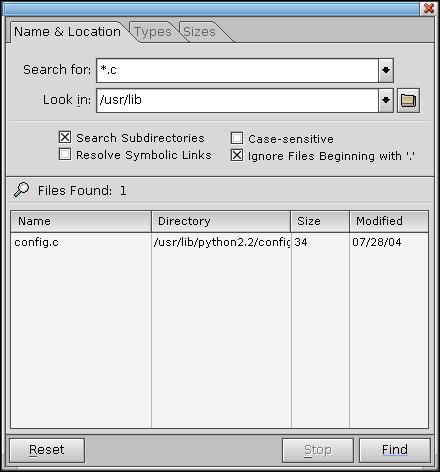
Searching for files with phfind.
The application has three tabs, Name & Location, Types, and Sizes:
- The Name & Location tab lets you enter a file name, select the search path, and set basic search options.
- The Types tab lets you set a filter for the types of files phfind looks for. For a description of the types of files in a QNX filesystem, see "Working with files" in the Neutrino User Guide.
- The Sizes tab lets you set a filesize range for files found by phfind.
See also:
Using the Photon microGUI in the Neutrino User's Guide
|
|
|
|