PtClock
![[Previous]](prev.gif) |
![[Contents]](contents.gif) |
![[Index]](keyword_index.gif) |
![[Next]](next.gif) |
PtClock
An analog, digital, or LED clock
Class hierarchy:
PtWidget --> PtBasic --> PtClock
For more information, see the diagram of the widget hierarchy.
PhAB icon:

Public header:
<photon/PtClock.h>
Description:
A PtClock draws a clock and can optionally update its display periodically (about once a second) to reflect the current time.
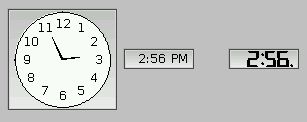
Analog, digital, and LED clocks created by PtClock.
PtClock follows the system time, but don't rely on it to be accurate all the time.
 |
The widget may flicker excessively, particularly if you use a transparent fill
color.
To reduce flicker, use a nontransparent fill color or
disable the display of seconds.
Alternatively, you can place the clock in a PtOSContainer, but you must use a transparent fill for the clock, or it won't be refreshed properly. |
New resources:
| Resource | C type | Pt type | Default |
|---|---|---|---|
| Pt_ARG_CLOCK_FACE_COLOR | PgColor_t | Scalar | Pg_WHITE |
| Pt_ARG_CLOCK_FACE_OUTLINE_COLOR | PgColor_t | Scalar | Pg_BLACK |
| Pt_ARG_CLOCK_FLAGS | long | Flag | See below. |
| Pt_ARG_CLOCK_FONT | char * | String | "TextFont09" |
| Pt_ARG_CLOCK_HOUR | short | Scalar | Pt_CLOCK_CURRENT |
| Pt_ARG_CLOCK_HOUR_COLOR | PgColor_t | Scalar | Pg_BLACK |
| Pt_ARG_CLOCK_HOUR_OFFSET | short | Scalar | 0 |
| Pt_ARG_CLOCK_MINUTE | short | Scalar | Pt_CLOCK_CURRENT |
| Pt_ARG_CLOCK_MINUTE_COLOR | PgColor_t | Scalar | Pg_BLACK |
| Pt_ARG_CLOCK_MINUTE_OFFSET | short | Scalar | 0 |
| Pt_ARG_CLOCK_SECOND | short | Scalar | Pt_CLOCK_CURRENT |
| Pt_ARG_CLOCK_SECOND_COLOR | PgColor_t | Scalar | Pg_RED |
| Pt_ARG_CLOCK_SECOND_OFFSET | short | Scalar | 0 |
| Pt_ARG_CLOCK_SEP1 | char * | String | ":" |
| Pt_ARG_CLOCK_SEP1_COLOR | PgColor_t | Scalar | Pg_BLACK |
| Pt_ARG_CLOCK_SEP2 | char * | String | ":" |
| Pt_ARG_CLOCK_SEP2_COLOR | PgColor_t | Scalar | Pg_BLACK |
| Pt_ARG_CLOCK_TYPE | short | Scalar | Pt_CLOCK_ANALOG |
| Pt_CB_CLOCK_TIME_CHANGED | PtCallback_t * | Link | NULL |
Pt_ARG_CLOCK_FACE_COLOR
| C type | Pt type | Default |
|---|---|---|
| PgColor_t | Scalar | Pg_WHITE |
The fill color of the clock's face (applicable only for analog clocks). See PgColor_t in the Photon Library Reference.
Pt_ARG_CLOCK_FACE_OUTLINE_COLOR
| C type | Pt type | Default |
|---|---|---|
| PgColor_t | Scalar | Pg_BLACK |
The color of the line drawn around the clock face (applicable only for analog clocks). See PgColor_t in the Photon Library Reference.
Pt_ARG_CLOCK_FLAGS
| C type | Pt type | Default |
|---|---|---|
| long | Flag | Pt_CLOCK_TRACK_TIME | Pt_CLOCK_SHOW_SECONDS | Pt_CLOCK_SHOW_NUMBERS |
Defines the clock's behavior. Possible values are:
- Pt_CLOCK_24_HOUR
- Use a 24-hour display rather than conventional 12-hour format. This flag overrides Pt_CLOCK_SHOW_AMPM.
- Pt_CLOCK_PAD_HOURS
- Pad the hour field with a leading zero such that there are always 2 digits in the hours field (applicable only for digital or LED clocks).
- Pt_CLOCK_SHOW_AMPM
- Display an AM/PM indicator. For digital clocks, this is rendered as an AM or PM suffix. For LED clocks, this is rendered as a dot in the upper right corner (AM) or lower right corner (PM) of the display. This flag has no effect on analog clocks, and is overridden by the Pt_CLOCK_24_HOUR flag.
- Pt_CLOCK_SHOW_NUMBERS
- Display numbers on the face (applicable only for analog clocks).
- Pt_CLOCK_SHOW_SECONDS
- Display the seconds component of the time.
- Pt_CLOCK_TRACK_TIME
- Update the clock every second to reflect the current time. If this flag isn't set, the clock holds its current setting until it's changed programmatically or the flag is reenabled.
Pt_ARG_CLOCK_FONT
| C type | Pt type | Default |
|---|---|---|
| char * | String | "TextFont09" |
The font to use. For analog clocks, this applies to the numbers on the face (if displayed). For digital clocks, this applies to the entire display.
Pt_ARG_CLOCK_HOUR
| C type | Pt type | Default |
|---|---|---|
| short | Scalar | Pt_CLOCK_CURRENT |
The current hour setting for the clock (reflecting the current system clock setting if Pt_CLOCK_TRACK_TIME is set). This value is in 24-hour format.
If you set this resource to Pt_CLOCK_CURRENT, the clock is set to the current system time.
Pt_ARG_CLOCK_HOUR_COLOR
| C type | Pt type | Default |
|---|---|---|
| PgColor_t | Scalar | Pg_BLACK |
The color to use when drawing the hours component. See PgColor_t in the Photon Library Reference.
Pt_ARG_CLOCK_HOUR_OFFSET
| C type | Pt type | Default |
|---|---|---|
| short | Scalar | 0 |
Offset the clock setting by this amount when displaying the hours field.
Pt_ARG_CLOCK_MINUTE
| C type | Pt type | Default |
|---|---|---|
| short | Scalar | Pt_CLOCK_CURRENT |
The current minute setting for the clock (reflecting the current system clock setting if Pt_CLOCK_TRACK_TIME is set). If you set this resource to Pt_CLOCK_CURRENT, the clock is set to the current system time.
Pt_ARG_CLOCK_MINUTE_COLOR
| C type | Pt type | Default |
|---|---|---|
| PgColor_t | Scalar | Pg_BLACK |
The color to use when drawing the minutes component. See PgColor_t in the Photon Library Reference.
Pt_ARG_CLOCK_MINUTE_OFFSET
| C type | Pt type | Default |
|---|---|---|
| short | Scalar | 0 |
Offset the clock setting by this amount when displaying the minutes field.
Pt_ARG_CLOCK_SECOND
| C type | Pt type | Default |
|---|---|---|
| short | Scalar | Pt_CLOCK_CURRENT |
The current second setting for the clock (reflecting the current system clock setting if Pt_CLOCK_TRACK_TIME is set). If you set this resource to Pt_CLOCK_CURRENT, the clock is set to the current system time.
Pt_ARG_CLOCK_SECOND_COLOR
| C type | Pt type | Default |
|---|---|---|
| PgColor_t | Scalar | Pg_RED |
The color to use when drawing the seconds component. See PgColor_t in the Photon Library Reference.
Pt_ARG_CLOCK_SECOND_OFFSET
| C type | Pt type | Default |
|---|---|---|
| short | Scalar | 0 |
Offset the clock setting by this amount when displaying the seconds field.
Pt_ARG_CLOCK_SEP1
| C type | Pt type | Default |
|---|---|---|
| char * | String | ":" |
The separator to use between the hours and minutes field (applicable only for digital clocks; LED clocks always use a colon). Only the first character of the string is used.
Pt_ARG_CLOCK_SEP1_COLOR
| C type | Pt type | Default |
|---|---|---|
| PgColor_t | Scalar | Pg_BLACK |
The color to use when drawing the separator character between hours and minutes. See PgColor_t in the Photon Library Reference.
Pt_ARG_CLOCK_SEP2
| C type | Pt type | Default |
|---|---|---|
| char * | String | ":" |
The separator to use between the minutes and seconds field (applicable only for digital clocks with Pt_CLOCK_SHOW_SECONDS set; LED clocks always use a colon). Only the first character of the string is used.
Pt_ARG_CLOCK_SEP2_COLOR
| C type | Pt type | Default |
|---|---|---|
| PgColor_t | Scalar | Pg_BLACK |
The color to use when drawing the separator character between minutes and seconds. See PgColor_t in the Photon Library Reference.
Pt_ARG_CLOCK_TYPE
| C type | Pt type | Default |
|---|---|---|
| short | Scalar | Pt_CLOCK_ANALOG |
The clock type:
- Pt_CLOCK_DIGITAL
- A numeric display (using system fonts).
- Pt_CLOCK_LED
- A scalable display that resembles conventional LED/LCD digital clocks.
- Pt_CLOCK_ANALOG
- An analog clock with hands.
Pt_CB_CLOCK_TIME_CHANGED
| C type | Pt type | Default |
|---|---|---|
| PtCallback_t * | Link | NULL |
A list of PtCallback_t structures that define the callbacks invoked when the time on the clock changes. This occurs once a second if Pt_CLOCK_SHOW_SECONDS is set, otherwise once every minute when the minute changes.
If the widget has the Pt_CALLBACKS_ACTIVE bit set in its Pt_ARG_FLAGS resource, these callbacks are also invoked when your application changes the time by calling PtSetResource() or PtSetResources().
Each callback is passed a PtCallbackInfo_t structure that contains at least the following members:
- reason
- Pt_CB_CLOCK_TIME_CHANGED
- reason_subtype
- Why this callback was invoked. This value is a flag that may
contain any of the following (ORed together):
- Pt_CLOCK_HOUR_CHANGED
- Pt_CLOCK_MINUTE_CHANGED
- Pt_CLOCK_SECOND_CHANGED
- event
- A pointer to a PhEvent_t structure that describes the event that caused the callback to be invoked. If event is NULL, the callback was invoked because your application changed the time setting by calling PtSetResources().
- cbdata
-
A pointer to a PtClockTimeCallback_t structure that
contains at least:
- short hour -- The new hour displayed on the clock (in 24-hour format). Note that this includes the hour offset, if any.
- short minute -- The new minute displayed on the clock.
- short second -- The new second displayed on the clock.
- short old_hour -- The previous hour displayed on the clock before the change was made (in 24-hour format). Note that this includes the hour offset, if any.
- short old_minute -- The previous minute displayed on the clock before the change was made.
- short old_second -- The previous second displayed on the clock before the change was made.
These callbacks should return Pt_CONTINUE.
Inherited resources:
If the widget modifies an inherited resource, the "Default override" column indicates the new value. This modification affects any subclasses of the widget.
|
|
|
|