PtFontSel
![[Previous]](prev.gif) |
![[Contents]](contents.gif) |
![[Index]](keyword_index.gif) |
![[Next]](next.gif) |
PtFontSel
A widget for selecting font attributes
Class hierarchy:
PtWidget --> PtBasic --> PtContainer --> PtFontSel
For more information, see the diagram of the widget hierarchy.
PhAB icon:

Public header:
<photon/PtFontSel.h>
Description:
The PtFontSel widget lets you select font attributes.
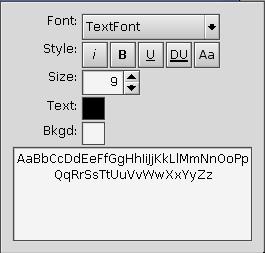
A PtFontSel widget.
A PtFontSel widget lets you select the:
- font family
- style (italic, bold, underline, double underline, and case)
- font size
- text and background color
The PtFontSel shows sample text that reflects the current font format choices.
New resources:
| Resource | C type | Pt type | Default |
|---|---|---|---|
| Pt_ARG_FONT_DISPLAY | unsigned short | Flag | Pt_FONTSEL_ALL_FONTS |
| Pt_ARG_FONT_FLAGS | unsigned short | Flag | Pt_FONTSEL_SAMPLE | Pt_FONTSEL_AA_CHECK |
| Pt_ARG_FONT_LBL_BKGDCOLOR | char * | String | "Bkgd:" |
| Pt_ARG_FONT_LBL_FONT | char * | String | "Font:" |
| Pt_ARG_FONT_LBL_SIZE | char * | String | "Size:" |
| Pt_ARG_FONT_LBL_STYLE | char * | String | "Style:" |
| Pt_ARG_FONT_LBL_TEXTCOLOR | char * | String | "Text:" |
| Pt_ARG_FONT_NAME | char * | String | "TextFont09" |
| Pt_ARG_FONT_POINT_SIZE_MAX | long | Scalar | 9999 |
| Pt_ARG_FONT_SAMPLE | char * | String | "AaBbCcXxYyZz" |
| Pt_ARG_FONT_SYMBOL | long | Scalar | 'A' |
| Pt_ARG_FONT_TEXT_COLOR | PgColor_t | Scalar | Pg_BLACK |
| Pt_ARG_FONT_TEXT_BKGD_COLOR | PgColor_t | Scalar | Pg_WHITE |
| Pt_CB_FONT_MODIFY | PtCallback_t * | Link | NULL |
Pt_ARG_FONT_DISPLAY
| C type | Pt type | Default |
|---|---|---|
| unsigned short | Flag | Pt_FONTSEL_ALL_FONTS |
Flags to filter the inclusion of font families in the selection dialog (see PtFontSelection() in the Photon Library Reference). You can OR these flags together:
- Pt_FONTSEL_SCALABLE -- Include scalable fonts.
- Pt_FONTSEL_BITMAP -- Include bitmap fonts.
- Pt_FONTSEL_FIXED -- Include fixed-width fonts.
- Pt_FONTSEL_PROP -- Include proportional-width fonts.
You can use Pt_FONTSEL_ALL_FONTS to override this filtering.
Pt_ARG_FONT_FLAGS
| C type | Pt type | Default |
|---|---|---|
| unsigned short | Flag | Pt_FONTSEL_SAMPLE | Pt_FONTSEL_AA_CHECK |
Flags to modify the appearance of the widget:
- Pt_FONTSEL_SAMPLE -- show a sample text string in the current font.
- Pt_FONTSEL_AA_CHECK -- allow the use of the anti-aliasing (A/A) button only for scalable fonts. For normal bitmap fonts, this button is dimmed. However, external font mapping rules may supplement bitmap fonts with scalable fonts at certain point sizes, allowing this attribute to be applied.
- Pt_FONTSEL_COLORSEL_BKGD -- display a sample of the background color to be used for the text. If you click on the sample, you can change the color.
- Pt_FONTSEL_COLORSEL_TEXT -- display a sample of the color to be used for the text. If you click on the sample, you can change the color.
Pt_ARG_FONT_LBL_BKGDCOLOR
| C type | Pt type | Default |
|---|---|---|
| char * | String | "Bkgd:" |
The label for the background color.
Pt_ARG_FONT_LBL_FONT
| C type | Pt type | Default |
|---|---|---|
| char * | String | "Font:" |
The label beside the combo box for choosing the font.
Pt_ARG_FONT_LBL_SIZE
| C type | Pt type | Default |
|---|---|---|
| char * | String | "Size:" |
The label used beside the font-size field.
Pt_ARG_FONT_LBL_STYLE
| C type | Pt type | Default |
|---|---|---|
| char * | String | "Style:" |
The label used beside the Style combo box.
Pt_ARG_FONT_LBL_TEXTCOLOR
| C type | Pt type | Default |
|---|---|---|
| char * | String | "Text:" |
The label for the text color.
Pt_ARG_FONT_NAME
| C type | Pt type | Default |
|---|---|---|
| char * | String | "TextFont09" |
The name of the initial font. This resource also reflects the currently selected font, style, quality, and size.
Pt_ARG_FONT_POINT_SIZE_MAX
| C type | Pt type | Default |
|---|---|---|
| long | Scalar | 9999 |
The maximum point size the font selector allows, with a maximum of 9999. If this resource is set to a size that is smaller than the current font size, the current size is set to the new maximum.
Pt_ARG_FONT_SAMPLE
| C type | Pt type | Default |
|---|---|---|
| char * | String | "AaBbCcXxYyZz" |
The string to be used as a sample display of the font (if the Pt_FONTSEL_SAMPLE flag is set).
Pt_ARG_FONT_SYMBOL
| C type | Pt type | Default |
|---|---|---|
| long | Scalar | 'A' |
A character used to filter the inclusion of font families in the selection dialog. Only those fonts that define this character are included.
You can use this resource to display only Latin fonts (set it to 'A') or Cyrillic fonts (set it to Pk_Cyrillic_IO). You can use the value Pt_FONTSEL_ALL_SYMBOLS to override this filtering.
Pt_ARG_FONT_TEXT_COLOR
| C type | Pt type | Default |
|---|---|---|
| PgColor_t | Scalar | Pg_BLACK |
The color of the text. See PgColor_t in the Photon Library Reference.
Pt_ARG_FONT_TEXT_BKGD_COLOR
| C type | Pt type | Default |
|---|---|---|
| PgColor_t | Scalar | Pg_WHITE |
The background color of the text. See PgColor_t in the Photon Library Reference.
Pt_CB_FONT_MODIFY
| C type | Pt type | Default |
|---|---|---|
| PtCallback_t * | Link | NULL |
A list of PtCallback_t structures that define the callbacks invoked when the selected font is modified.
If the widget has the Pt_CALLBACKS_ACTIVE bit set in its Pt_ARG_FLAGS resource, these callbacks are also invoked when your application changes the selected font by calling PtSetResource() or PtSetResources().
Each callback is passed a PtCallbackInfo_t structure that contains at least the following members:
- reason
- Pt_CB_FONT_MODIFY
- event
- A pointer to a PhEvent_t structure that describes the event that caused the callback to be invoked.
- cbdata
- A pointer to the name of the new font selection.
These callbacks should return Pt_CONTINUE.
Inherited resources:
If the widget modifies an inherited resource, the "Default override" column indicates the new value. This modification affects any subclasses of the widget.
Convenience functions:
The PtFontSel class defines the following convenience function:
- PtFontSelection()
- Display a modal dialog for selecting a font. See the Photon Library Reference.
|
|
|
|