PtScrollContainer
![[Previous]](prev.gif) |
![[Contents]](contents.gif) |
![[Index]](keyword_index.gif) |
![[Next]](next.gif) |
PtScrollContainer
A viewport for viewing a large virtual container
Class hierarchy:
PtWidget --> PtBasic --> PtContainer --> PtScrollArea --> PtScrollContainer
For more information, see the diagram of the widget hierarchy.
PhAB icon:

Public header:
<photon/PtScrollContainer.h>
Description:
A PtScrollContainer widget combines one or more scrollbar widgets and an area that provides a viewport onto a virtual display area. The virtual display area is a container for other widgets. Typically, the virtual area is larger than the viewing area; the scrollbar widgets let you bring any part of the virtual area into view.
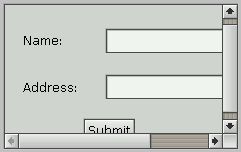
A PtScrollContainer widget acts as a viewport.
If the virtual area's size is significantly greater than that of the viewport (such as when a large textual document is being viewed), it's usually impractical in terms of performance and memory to use a scrolling area. This is because the widget for the virtual area keeps the entire contents of the object in memory and always renders the entire object, most of which gets clipped. In these cases, you should consider creating your own subclass of PtScrollArea to manage only the portion of the virtual area that's displayed.
Anchors and resize policy
Anchors between a scrollable area and its parent affect the scrollable area's visible area.
Children of the scrollable area are anchored to its virtual area.
The scrollable area's Pt_ARG_SCROLLCONT_RESIZE_FLAGS specify the resize policy that's applied to its virtual area. You can set the virtual area's size directly by modifying the resources associated with it. Otherwise, the area changes only under the following conditions:
- The Pt_AUTO_EXTENT flag is set.
OR
- The scrollable area's resize policy is set to allow it to
resize in response to a change in its contents (i.e. any of its
children change)
AND
- one of its children changes size, as a result of its resize
policy or a programmatic change
AND
- you call PtExtentWidget() on the scrollable area after the change.
Other layouts are possible by making another container, such as a group widget, a child of the scrollable area.
New resources:
| Resource | C type | Pt type | Default |
|---|---|---|---|
| Pt_ARG_SCROLLCONT_FLAGS | uint16_t | Flag | Pt_SCROLLCONT_TRACK_FOCUS |
| Pt_ARG_SCROLLCONT_RESIZE_FLAGS | long | Flag | Pt_RESIZE_XY_AS_REQUIRED |
Pt_ARG_SCROLLCONT_FLAGS
| C type | Pt type | Default |
|---|---|---|
| uint16_t | Flag | Pt_SCROLLCONT_TRACK_FOCUS |
Flags that control the appearance and behavior of the widget. The defined bits include:
- Pt_SCROLLCONT_TRACK_FOCUS
- Pan to accommodate the focused child as focus changes.
Pt_ARG_SCROLLCONT_RESIZE_FLAGS
| C type | Pt type | Default |
|---|---|---|
| long | Flag | Pt_RESIZE_XY_AS_REQUIRED |
Flags that control the resizing of the virtual area. The defined bits are the same as those defined for Pt_ARG_RESIZE_FLAGS:
- Pt_RESIZE_X_AS_REQUIRED
- Pt_RESIZE_X_ALWAYS
- Pt_RESIZE_X_INITIAL
- Pt_RESIZE_X_BITS
- Pt_RESIZE_Y_AS_REQUIRED
- Pt_RESIZE_Y_ALWAYS
- Pt_RESIZE_Y_INITIAL
- Pt_RESIZE_Y_BITS
- Pt_RESIZE_XY_ALWAYS
- Pt_RESIZE_XY_AS_REQUIRED
- Pt_RESIZE_XY_INITIAL
- Pt_RESIZE_XY_BITS
Inherited resources:
If the widget modifies an inherited resource, the "Default override" column indicates the new value. This modification affects any subclasses of the widget.
|
|
|
|