PtToggleButton
![[Previous]](prev.gif) |
![[Contents]](contents.gif) |
![[Index]](keyword_index.gif) |
![[Next]](next.gif) |
PtToggleButton
A toggle switch that's either off or on
Class hierarchy:
PtWidget --> PtBasic --> PtLabel --> PtButton --> PtToggleButton
For more information, see the diagram of the widget hierarchy.
PhAB icon:

Public header:
<photon/PtToggleButton.h>
Description:
A PtToggleButton widget is like a toggle switch, although it behaves like a button. It has on and off states, and pressing the button inverts the current state of the button.
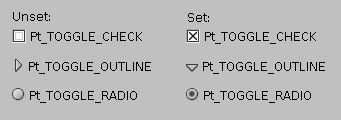
Various button styles supported by PtToggleButton.
Creating toggle buttons
Toggle buttons inherit resources from PtLabel and PtButton; specify the label for toggle buttons the way you do for these classes.
A toggle button is displayed as a button with a label beside it. The button is either set or unset, and you can control its appearance with the Pt_ARG_INDICATOR_COLOR and Pt_ARG_INDICATOR_TYPE resources. You can set the position of the text relative to the button with the Pt_ARG_BALLOON_POSITION resource.
You can also set Pt_ARG_ARM_COLOR, which specifies the fill color for the button's interior when the button is set. This resource is used only if the value of Pt_ARG_ARM_FILL is Pt_TRUE. These resources are inherited from PtButton.
To determine whether or not the button is set, check the:
- Pt_SET bit in the Pt_ARG_FLAGS resource -- see PtWidget
- Callback data passed to the Pt_CB_ACTIVATE callbacks -- see PtBasic.
Grouping toggle buttons
A group can control how several toggle buttons behave together. If you place the toggle buttons in a group and make them mutually exclusive, they behave like the channel-selector buttons on a car radio: only one of the buttons can be set at any given time, and setting any button automatically unsets the button that's currently set.
To make a group of toggle buttons mutually exclusive, set the Pt_GROUP_EXCLUSIVE bit in the group's Pt_ARG_GROUP_FLAGS resource. For example:
PtSetArg (&argt[n], Pt_ARG_GROUP_FLAGS, Pt_TRUE,
          Pt_GROUP_EXCLUSIVE );
n++;
PtSetArg (&argt[n], Pt_ARG_GROUP_ORIENTATION,
          Pt_GROUP_VERTICAL, 0 ) ;
n++;
group = PtCreateWidget (PtGroup, parent, n, argt );

PtSetArg (&argt[0], Pt_ARG_TEXT_STRING,
          "Button 1", 0 ) ;
button1 = PtCreateWidget (PtToggleButton, group,
                           1, argt ) ;

PtSetArg (&argt[0], Pt_ARG_TEXT_STRING,
          "Button 2", 0 ) ;
button2 = PtCreateWidget (PtToggleButton, group,
                          1, argt ) ;

PtSetArg (&argt[0], Pt_ARG_TEXT_STRING,
          "Button 3", 0 ) ;
button3 = PtCreateWidget (PtToggleButton, group,
                          1, argt ) ;

PtRealizeWidget ( group ) ;
You can use the same callback for all the buttons, but how do you determine which one is selected? There are several ways:
- Specify a
Pt_CB_ACTIVATE
callback (see
PtBasic)
for the group.
The PtGroup adds its callback to each of its children;
when the callback is invoked, the widget
argument is a pointer to the selected button, not the group.
You can compare the pointer to previously saved pointers to the buttons.
Or:
- Store a unique value in each button's
Pt_ARG_USER_DATA
resource (see
PtWidget).
In the callback, get this resource and use its value to determine which
button was pressed.
Or:
- If you create the buttons in code (instead of in PhAB), you can pass a unique value in the client_data argument to the callback routine.
New resources:
| Resource | C type | Pt type | Default |
|---|---|---|---|
| Pt_ARG_INDICATOR_COLOR | PgColor_t | Scalar | Pg_WHITE |
| Pt_ARG_INDICATOR_TYPE | unsigned char | Scalar | Pt_TOGGLE_CHECK |
Pt_ARG_INDICATOR_COLOR
| C type | Pt type | Default |
|---|---|---|
| PgColor_t | Scalar | Pg_WHITE |
The fill color for the toggle button's indicator. See PgColor_t in the Photon Library Reference.
Pt_ARG_INDICATOR_TYPE
| C type | Pt type | Default |
|---|---|---|
| unsigned char | Scalar | Pt_TOGGLE_CHECK |
Determines how the indicator is drawn. Possible values:
- Pt_TOGGLE_RADIO
- Pt_TOGGLE_CHECK
- Pt_TOGGLE_OUTLINE
Here's how these types look, both set and unset:
Inherited resources:
If the widget modifies an inherited resource, the "Default override" column indicates the new value. This modification affects any subclasses of the widget.
|
|
|
|