PtTree
![[Previous]](prev.gif) |
![[Contents]](contents.gif) |
![[Index]](keyword_index.gif) |
![[Next]](next.gif) |
PtTree
A tree of items that collapse and expand as requested
Class hierarchy:
PtWidget --> PtBasic --> PtContainer --> PtCompound --> PtGenList --> PtGenTree --> PtTree
For more information, see the diagram of the widget hierarchy.
PhAB icon:

Public header:
<photon/PtTree.h>
Description:
The PtTree widget displays a tree of items that collapse or expand according to your selections. PtTree assumes that each tree item contains two images and a string.
A PtTree widget, as used in the Helpviewer.
Allocating items and building a tree
The items in a PtTree are stored in structures of type PtTreeItem_t, which you should allocate by calling PtTreeAllocItem() or PtTreeCreateItem(). The PtTree widget frees all its items automatically when it's destroyed.
 |
The item structure contains a "user data" pointer that you can use to store any data you want to associate with the item; the widget ignores this pointer. There are some functions that free items, but none of them attempts to free the user data. |
PtTreeAllocItem() takes as arguments:
- a pointer to the tree widget -- this must be the same widget that the item will be added to
- the text to display for the item
- indexes of images to use when the item is "set" and "unset" -- we'll look at these later.
This function uses the font and image list stored in the tree widget to determine the item's dimensions. This means that between creating an item and adding it to the widget, you mustn't change the widget's font or images.
PtTreeCreateItem() is similar to PtTreeAllocItem(), except instead of the set and unset image indexes, it takes a pointer to a PtTreeItemAttributes_t structure which defines the set and unset images, as well as font and color attributes for the item's text.
Use PtTreeAddFirst() and PtTreeAddAfter() to build a tree. For example, suppose you wanted to build the following tree:
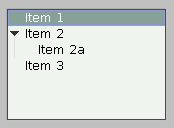
A PtTree without images.
Assuming your tree widget is referenced by tree_wgt, use the following code:
PtTreeItem_t *item, *brother;
char *text;

/* Add "Item 1" as first root item */

text = "Item 1";
item = PtTreeAllocItem(tree_wgt, text, -1, -1);
PtTreeAddFirst(tree_wgt, item, NULL);
brother = item;

/* Add "Item 2" as root item after "Item 1" */

text = "Item 2";
item = PtTreeAllocItem(tree_wgt, text, -1, -1);
PtTreeAddAfter(tree_wgt, item, brother);
brother = item;

/* Add "Item 2a" as first child of "Item 2" */

text = "Item 2a";
item = PtTreeAllocItem(tree_wgt, text, -1, -1);
PtTreeAddFirst(tree_wgt, item, brother);

/* Add "Item 3" as root item after "Item 2" */

text = "Item 3";
item = PtTreeAllocItem(tree_wgt, text, -1, -1);
PtTreeAddAfter(tree_wgt, item, brother);
Using images in tree items
The array of all available images is stored in the widget's Pt_ARG_TREE_IMAGES resource; the items contain indexes into this array.
Before allocating the tree items, set up the array of images; PtTreeAddImages() provides a convenient way to do this.
When you call PtTreeAllocItem() to allocate the tree items, specify the index of the icons to use when the item is set or unset. To specify the meaning of "set" and "unset", use the Pt_ARG_TREE_IMGMASK resource.
Alternatively, you can use PtTreeCreateItem() or PtTreeChangeItem() to assign images not in the Pt_ARG_TREE_IMGMASK resource to a tree item.
Here's some code that sets up a tree with images:
PtTreeItem_t *item, *brother;
char *text;
int closed_dir, closed_file, open_dir, open_file;

/* Extract the images from a widget database and add them
   to the tree's array of images: */

closed_dir  = PtTreeAddImages (tree_wgt,
                 ApGetImageRes (database, "dir_closed"), 1);
closed_file = PtTreeAddImages (tree_wgt,
                 ApGetImageRes (database, "file_closed"), 1);
open_dir    = PtTreeAddImages (tree_wgt,
                 ApGetImageRes (database, "dir_open"), 1);
open_file   = PtTreeAddImages (tree_wgt,
                 ApGetImageRes (database, "file_open"), 1);

/* Add "Directory 1" as first root item */

text = "Directory 1";
item = PtTreeAllocItem(tree_wgt, text, open_dir, closed_dir);
PtTreeAddFirst(tree_wgt, item, NULL);
brother = item;

/* Add "Directory 2" as root item after "Directory 1" */

text = "Directory 2";
item = PtTreeAllocItem(tree_wgt, text, open_dir, closed_dir);
PtTreeAddAfter(tree_wgt, item, brother);
brother = item;

/* Add "My File" as first child of "Directory 2" */

text = "My File";
item = PtTreeAllocItem(tree_wgt, text, open_file, closed_file);
PtTreeAddFirst(tree_wgt, item, brother);

/* Add "Directory 3" as root item after "Directory 2" */

text = "Directory 3";
item = PtTreeAllocItem(tree_wgt, text, open_dir, closed_dir);
PtTreeAddAfter(tree_wgt, item, brother);
The tree's Pt_ARG_TREE_IMGMASK is set to Pt_TREE_ITEM_EXPANDED so that the "open" icon is displayed when the tree item is expanded. The tree looks like this:
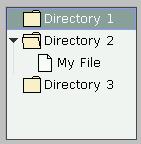
A PtTree with images.
Displaying text in columns
To display items in columns, you can:
-
Create a PtDivider
widget as a child of the PtTree. Put it at the
top of the tree, and create (for example) PtButton widgets
as children of the divider, one for each column. The width of
each button is the width of the column.
Or
- Use the Pt_ARG_LIST_COLUMN_POS resource inherited from PtGenList.
With both methods, use the Tab character in the item strings as a column separator.
|
Even if you use columns, each line in the tree remains a single item. When you select any part of the line, the entire line is selected -- having columns doesn't make the tree into a spreadsheet. |
Displaying images in columns
You can make your PtTree display clickable images instead of text in selected columns. Here's how:
Set the Pt_LIST_COLUMN_NO_STRING flag in the PtGenList column attributes (Pt_ARG_LIST_COLUMN_ATTR) for each column that you want to display images. This prevents text from being drawn on top of images. For example:
static const PtListColumnAttributes_t latrs[] = {
    { Pt_LIST_COLUMN_LEFT },
    { Pt_LIST_COLUMN_CENTER | Pt_LIST_COLUMN_NO_STRING }
    };

PtSetResource( ABW_tree, Pt_ARG_LIST_COLUMN_ATTR, latrs,
               sizeof(latrs) / sizeof(latrs[0]) );
|
A tab character in an item's string skips over a column flagged as Pt_LIST_COLUMN_NO_STRING. For example, if the second column has the flag set, you need only one tab character between the strings for the first and the third column. |
Set up an array of image pointers for each column and an array of tree column attributes (Pt_ARG_TREE_COLUMN_ATTR):
static const PhImage_t *images[3] = { &image1, &image2,
                                      &image3 };

static const PtTreeColumnAttributes_t tatrs[] = {
    /* The first column has no images: */
    { NULL, 0, Pt_TREE_COLUMN_NOCB },
    { images, sizeof(images) / sizeof(images[0]),
        Pt_TREE_COLUMN_NOSELECT,
        Pt_LIST_ITEM_FLAG_USER1 | Pt_LIST_ITEM_FLAG_USER2
        }
    };

PtSetResource( ABW_tree, Pt_ARG_LIST_COLUMN_ATTR, tatrs,
               sizeof(tatrs) / sizeof(tatrs[0]) );
Optionally, write an image-selector function and attach it to the Pt_ARG_TREE_COLUMN_IMGFUN resource.
This function takes as arguments a tree item, a column index, and a column attributes structure, and returns an index into the column's image array (or -1 for no image). You need this function only if:
- You need more than two states per column (i.e. either
two images to choose from or one image that can be either present or
absent)
Or:
- You want to use something other than an item flag to distinguish between these two states.
For example:
static int image_selector(
              PtWidget_t *widget,
              PtTreeItem_t *item,
              PtTreeColumnAttributes_t const *cattr,
              unsigned cindex )
{
    unsigned const flags = item->gen.list.flags;
    int result = -1;

    /* We don't really need to check if cindex is one
       because we only have one column that displays images.
       But for the sake of example... */

    if ( cindex == 1 ) {
        /* This column has three images and four possible
           states (no image is the fourth state).
           The function should return -1 for no image and
           0...3 to pick an image. */

        if ( flags & Pt_LIST_ITEM_FLAG_USER2 )
            result += 2;
        if ( flags & Pt_LIST_ITEM_FLAG_USER1 )
            result += 1;
        }
    return result;
}
...
PtSetResource( ABW_tree, Pt_ARG_TREE_COLUMN_IMGFUN,
               image_selector, 0 );
Optionally, attach a Pt_CB_TREE_COLUMN_SEL callback that both notifies your application when you click on a column, and lets you control how the item's state changes.
For instance, the following callback makes your items cycle through the four possible states:
static int column_cb( PtWidget_t *widget, void *data,
                      PtCallbackInfo_t *cbinfo ) {
    PtTreeCallback_t *tcb = cbinfo->cbdata;
    if ( tcb->column == 1 ) {
        if ( tcb->new_flags & Pt_LIST_ITEM_FLAG_USER1 )
            tcb->new_flags ^= Pt_LIST_ITEM_FLAG_USER2;
        }
    return Pt_CONTINUE;
    }
New resources:
| Resource | C type | Pt type | Default |
|---|---|---|---|
| Pt_ARG_TREE_BALLOON | PtTreeBalloonF_t * | Pointer | See below |
| Pt_ARG_TREE_COLUMN_ATTR | See below | Array | NULL |
| Pt_ARG_TREE_COLUMN_IMGFUN | See below | Pointer | See below |
| Pt_ARG_TREE_IMAGES | PhImage_t *, short | Array | NULL |
| Pt_ARG_TREE_IMGMASK | unsigned | Scalar | Pt_LIST_ITEM_SELECTED |
| Pt_CB_TREE_COLUMN_SEL | PtCallback_t * | Link | NULL |
| Pt_CB_TREE_SELECTION | PtCallback_t * | Link | NULL |
| Pt_CB_TREE_STATE | PtCallback_t * | Link | NULL |
Pt_ARG_TREE_BALLOON
| C type | Pt type | Default |
|---|---|---|
| PtTreeBalloonF_t * | Pointer | See below |
A function that inflates a balloon for the item the pointer is on. PtTreeBalloonF_t is a function type:
typedef PtWidget_t *PtTreeBalloonF_t( PtWidget_t *widget,
                                      PtWidget_t *parent,
                                      PhArea_t *area,
                                      PtListColumn_t *column,
                                      PtTreeItem_t *item,
                                      int coln,
                                      const char *font );
The parameters are as follows:
- widget
- A pointer to the PtTree widget.
- parent
- A pointer to its parent window.
- area
- A pointer to a PhArea_t structure (see the Photon Library Reference) that covers the item. The area->pos member is relative to the parent window.
- column
- A pointer to a PtListColumn_t structure that indicates the position of the column the pointer is on. For information about this structure, see the Pt_ARG_LIST_COLUMN_POS resource inherited from PtGenList.
- item
- A pointer to the item the pointer is on.
- coln
- The index of the column the pointer is on.
- font
- The value of the widget's Pt_ARG_LIST_FONT resource.
The default function does this:
return
    PtGenListCreateTextBalloon(
      widget, parent,
      PtGenListSetColumnBalloon ( area, column ),
      item->string, coln, font);
Pt_ARG_TREE_COLUMN_ATTR
| C type | Pt type | Default |
|---|---|---|
| PtTreeColumnAttributes_t, short | Array | NULL |
Attributes for the tree's columns. This resource is an array of PtTreeColumnAttributes_t structures. The structure contains at least the following members (in the following order -- static initialization is OK):
- PhImage_t const **images
- An array of image pointers. When you set the resource, this array is copied, but the PhImage_t structures pointed to by it aren't.
- unsigned short nimages
- The number of entries in the images array.
- unsigned short cflags
- Column flags; any combination of:
- Pt_TREE_COLUMN_NOSELECT -- when set, clicking on this column doesn't cause selection.
- Pt_TREE_COLUMN_NOCURRENT -- when set, clicking on this column doesn't even set the current item (see "Current item" in the description of PtGenList).
- Pt_TREE_COLUMN_NOCB -- when set, clicking on this column doesn't change the item's flags or invoke the Pt_CB_TREE_COLUMN_SEL callback.
- unsigned iflags
- Item flags that are used to select this column's image. See Pt_ARG_TREE_COLUMN_IMGFUN and Pt_CB_TREE_COLUMN_SEL
Pt_ARG_TREE_COLUMN_IMGFUN
| C type | Pt type | Default |
|---|---|---|
| PtTreeColumnImageF_t * | Pointer | See below |
This function is called by the draw function for each item and each column that has the Pt_LIST_COLUMN_NO_STRING flag in the Pt_ARG_LIST_COLUMN_ATTR resource (see PtGenList) and a nonempty image array defined in the Pt_ARG_TREE_COLUMN_ATTR resource.
The function must be of the following type:
typedef int PtTreeColumnImageF_t(
               PtWidget_t *widget,
               PtTreeItem_t *item,
               PtTreeColumnAttributes_t const *cattr,
               unsigned cindex );
The arguments are:
- widget
- A pointer to the PtTree widget.
- item
- A pointer to the item being drawn.
- cattr
- A pointer to a PtTreeColumnAttributes_t structure that describes the column attributes. For information about this structure, see Pt_ARG_TREE_COLUMN_ATTR.
- cindex
- The column index.
The function should return an index into the image array, or -1 if no image should be drawn. If you return a value that's equal to or greater than the column's nimages, no image is drawn.
The default function returns 0 or 1, depending on whether the column's iflags ANDed with the item's flags gives a nonzero result.
|
The function attached to this resource isn't allowed to modify anything and should be quick, since it's called a lot. |
For an example, see "Displaying images in columns," above.
Pt_ARG_TREE_IMAGES
| C type | Pt type | Default |
|---|---|---|
| PhImage_t *, short | Array | NULL |
A list of images that can be displayed with tree items. For more information about the image structure, see PhImage_t in the Photon Library Reference.
|
Set the flags member of the PhImage_t structures
to: Ph_RELEASE_IMAGE | Ph_RELEASE_PALETTE | Ph_RELEASE_TRANSPARENCY_MASK | Ph_RELEASE_GHOST_BITMAP before providing the images to the widget. If you do this, the memory used for the images is released when the widget is destroyed or Pt_ARG_TREE_IMAGES is set. |
For a convenient way to add images, see PtTreeAddImages(); for an example, see "Using images in tree items," above.
Pt_ARG_TREE_IMGMASK
| C type | Pt type | Default |
|---|---|---|
| unsigned | Scalar | Pt_LIST_ITEM_SELECTED |
Defines the mask for selecting an item's image.
When you create an item by calling PtTreeAllocItem(), you specify the images to be used when the item is set or unset. An item is considered set if its flags masked with the tree's Pt_ARG_TREE_IMGMASK resource give a nonzero value. The flags include:
- Pt_LIST_ITEM_SELECTED
- The item is selected.
- Pt_LIST_ITEM_CURRENT
- The item is the current item (see "Current item" in the description of PtGenList).
- Pt_TREE_ITEM_EXPANDABLE
- The item can be expanded.
- Pt_TREE_ITEM_EXPANDED
- The branches of this item are currently displayed.
Pt_CB_TREE_COLUMN_SEL
| C type | Pt type | Default |
|---|---|---|
| PtCallback_t * | Link | NULL |
A list of PtCallback_t structures that define the callbacks that are invoked when you click on a column that has an entry in the Pt_ARG_TREE_COLUMN_ATTR array but the Pt_TREE_COLUMN_NOCB flag in that entry isn't set.
Each callback is passed a PtCallbackInfo_t structure that contains at least the following members:
- reason
- Pt_CB_TREE_COLUMN_SEL
- reason_subtype
- 0 (not used).
- event
- A pointer to a PhEvent_t structure that describes the event that caused the callback to be invoked.
- cbdata
- A pointer to a PtTreeCallback_t structure
that includes:
- unsigned sel_mode;
- The current selection mode (Pt_ARG_SELECTION_MODE).
- PtTreeItem_t *item;
- If the selection mode isn't set to Pt_RANGE_MODE, item is a pointer to the item you clicked on. If the selection mode is set to Pt_RANGE_MODE, item is a pointer to the first of the selected items.
- unsigned nitems;
- This contains the number of selected items, excluding collapsed subtrees.
- int click_count;
- The number of mouse clicks (0 for keyboard events or if event is NULL).
- unsigned old_iflags
- The current value of the item's flags.
- unsigned new_iflags
- The value of the item's flags, to be set after the callback
functions return.
Only the "user flags" (Pt_LIST_ITEM_FLAG_USER[1234] defined in PtGenList.h) and Pt_LIST_ITEM_DAMAGED are looked at. The initial value of new_flags is calculated as follows:
- Set new_iflags to old_iflags;
- If the column attributes entry has any of the user flags set in iflags, flip those flags in new_iflags and set Pt_LIST_ITEM_DAMAGED.
After the callback functions return, the user flags are copied back from new_iflags and if the Pt_LIST_ITEM_DAMAGED flag is set in new_iflags, the item is damaged. Make sure that you set the Pt_LIST_ITEM_DAMAGED flag if you modify new_iflags in a way that requires the item to be redrawn, particularly if you have your own function attached to the Pt_ARG_TREE_COLUMN_IMGFUN resource.
- int column
- The column number, or -1 if none.
- PtTreeColumnAttributes_t const *cattr
- A pointer to the attributes of that column, if any. For information about this structure, see Pt_ARG_TREE_COLUMN_ATTR.
These callbacks should return Pt_CONTINUE.
For an example, see "Displaying images in columns," above.
Pt_CB_TREE_SELECTION
| C type | Pt type | Default |
|---|---|---|
| PtCallback_t * | Link | NULL |
A list of PtCallback_t structures that define the callbacks invoked when you select an item from the tree.
Each callback is passed a PtCallbackInfo_t structure that contains at least the following members:
- reason
- Pt_CB_TREE_SELECTION
- reason_subtype
- This value depends on the selection mode. One of:
- Pt_LIST_SELECTION_FINAL
- Pt_LIST_SELECTION_BROWSE
- Pt_LIST_SELECTION_CANCEL
- event
- A pointer to a PhEvent_t structure that describes the event that caused the callback to be invoked.
- cbdata
- A pointer to a PtTreeCallback_t structure
that contains at least the following members:
- unsigned sel_mode;
- The current selection mode (Pt_ARG_SELECTION_MODE).
- PtTreeItem_t *item;
- If the selection mode isn't set to Pt_RANGE_MODE, item is a pointer to the item you clicked on. If the selection mode is set to Pt_RANGE_MODE, item is a pointer to the first of the selected items.
- unsigned nitems;
- This contains the number of selected items, excluding collapsed subtrees.
- int click_count;
- The number of mouse clicks (0 for keyboard events).
These callbacks should return Pt_CONTINUE.
If you multi-click on a tree, its Pt_CB_TREE_SELECTION callbacks are invoked once for each click. The callback data includes the click count (1 for the first click, 2 for the second, and so on).
If you want to process only the last of a series of clicks, use a Pt_CB_RAW callback to look for a Ph_EV_BUT_RELEASE event with a subtype of Ph_EV_RELEASE_ENDCLICK. For more information, see PhEvent_t in the Photon Library Reference.
|
The Ph_EV_BUT_RELEASE event with a subtype of Ph_EV_RELEASE_ENDCLICK occurs approximately half a second after the click, which could be annoying to the user. Most Photon applications don't use multiple clicks because of this. |
Pt_CB_TREE_STATE
| C type | Pt type | Default |
|---|---|---|
| PtCallback_t * | Link | NULL |
A list of PtCallback_t structures that define the callbacks that are called before an item is expanded and after an item is collapsed. Each callback is passed a PtCallbackInfo_t structure that contains at least the following members:
- reason
- Pt_CB_TREE_STATE
- reason_subtype
- Pt_TREE_COLLAPSING or Pt_TREE_EXPANDING.
- event
- A pointer to a PhEvent_t structure that describes the event that caused the callback to be invoked.
- cbdata
- A pointer to a PtTreeCallback_t structure
that contains at least the following members:
- unsigned sel_mode;
- The current selection mode (Pt_ARG_SELECTION_MODE).
- PtTreeItem_t *item;
- A pointer to the item that's being collapsed or expanded.
- int expand;
- This field is initially set to 0. If the reason_subtype is Pt_TREE_EXPANDING, set expand to a nonzero value to suppress expansion.
These callbacks should return Pt_CONTINUE.
Inherited resources:
If the widget modifies an inherited resource, the "Default override" column indicates the new value. This modification affects any subclasses of the widget.
Pt_ARG_TREE_FLAGS
In addition to the flags defined by PtGenTree, the following flags are defined:
- Pt_TREE_BALLOON_ON_IMAGE -- the balloon is permitted to cover the image and the text
- Pt_TREE_BALLOON_ON_TREE -- the balloon is permitted to cover the tree, the image, and the text
By default, neither is set. The width and location of the balloon depend on these flags:
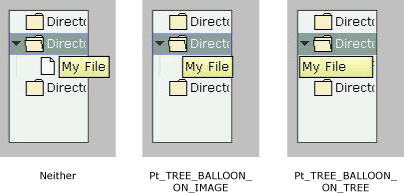
Additional Pt_ARG_TREE_FLAGS for a PtTree widget.
|
To make the balloons appear, set one of the balloon bits (e.g. Pt_LIST_BALLOON_AS_REQUIRED) in the Pt_ARG_LIST_FLAGS resource inherited from PtGenList. |
Pt_CB_DND
For Pt_CB_DND callbacks for a PtTree, the cbinfo->cbdata is a pointer to a PtTreeDndCallback_t structure, containing at least the following members:
- PtDndCallbackInfo_t dnd_info
- See the description of Pt_CB_DND for PtWidget.
- PtGenTreeItem_t *item
- A pointer to the PtGenTreeItem_t structure for the target item involved in the drag-and-drop operation. You can cast this to be a pointer to a PtTreeItem_t.
- int item_pos
- The index of that item.
- unsigned long flags
- Possible values:
- Pt_LIST_ITEM_DNDSELECTED_UP -- the drop occurred above the item.
- Pt_LIST_ITEM_DNDSELECTED_DOWN -- the drop occurred below the item.
- Pt_LIST_ITEM_DNDSELECTED_IN -- the drop occurred inside the item.
- int action
- This member is initially set to Pt_LIST_ITEM_DNDSELECTED_UP | Pt_LIST_ITEM_DNDSELECTED_DOWN | Pt_LIST_ITEM_DNDSELECTED_IN. You can unset some of these values to indicate that the drag-and-drop isn't accepted in that case. For example, if you unset Pt_LIST_ITEM_DNDSELECTED_IN, the drag-and-drop can't occur inside the item, only above or below.
Convenience functions:
The PtTree widget defines the following structures and convenience functions that make it easier to use the tree once it's been created:
- PtTreeAddAfter()
- Insert an item after the specified item
- PtTreeAddFirst()
- Add a root item to the widget, or add an item as the first child of a specified item
- PtTreeAddImages()
- Add images to the PtTree widget's image list
- PtTreeAllItems()
- Fill a buffer with pointers to all items
- PtTreeAllocItem()
- Allocate a new item
- PtTreeClearSelection()
- Clear the selection
- PtTreeCollapse()
- Collapse an expandable item
- PtTreeChangeItem()
- Change the text string and attributes of the specified item
- PtTreeCreateItem()
- Allocate a new item with attributes
- PtTreeExpand()
- Expand an expandable item
- PtTreeFreeAllItems()
- Unlink and free all items
- PtTreeFreeItems()
- Free an unlinked item
- PtTreeGetCurrent()
- Get the current item
- PtTreeGetSelIndexes()
- Fill a buffer with indexes of selected items
- PtTreeGoto()
- Set the current item
- PtTreeItem_t
- PtTree item structure
- PtTreeItemAttributes_t
- PtTree item attributes structure, used by PtTreeCreateItem() and PtTreeChangeItem().
- PtTreeItemIndex()
- Calculate the index of the specified item
- PtTreeModifyItem()
- Change item resources
- PtTreeModifyItemString()
- Change the string for a PtTree item
- PtTreeRemoveChildren()
- Unlink the children of the specified item
- PtTreeRemoveItem()
- Unlink an item
- PtTreeRemoveList()
- Unlink the given item and any siblings that follow
- PtTreeRootItem()
- Return the first root item of the tree
- PtTreeSelect()
- Select the specified item
- PtTreeSelectedItems()
- Fill a buffer with pointers to the selected items
- PtTreeSetSelIndexes()
- Set the selection indexes
- PtTreeShow()
- Set the position so that the specified item is visible
- PtTreeUnselect()
- Unselect the specified item
- PtTreeUnselectNonBrothers()
- Unselect all items that aren't siblings of the specified item
|
|
|
|