PtList
![[Previous]](prev.gif) |
![[Contents]](contents.gif) |
![[Index]](keyword_index.gif) |
![[Next]](next.gif) |
PtList
A scrolling list of text items
Class hierarchy:
PtWidget --> PtBasic --> PtContainer --> PtCompound --> PtGenList --> PtList
For more information, see the diagram of the widget hierarchy.
PhAB icon:

Public header:
<photon/PtList.h>
Description:
The PtList class displays a scrolling list of text items. You can select one or more items, depending on the selection policy.
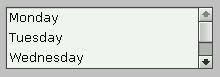
A PtList containing text items.
Lists are particularly useful for presenting a large or unknown number of textual items (e.g. a set of items changing over time). Lists have the added advantage of displaying the set of items currently selected, and allowing more than one item to be selected at once (see the Pt_ARG_SELECTION_MODE resource defined by PtGenList).
If the number of items is too large to display in the area allocated to the list, the widget can display a vertical scrollbar. You can use the inherited Pt_ARG_LIST_FLAGS resource to control when the scrollbar appears: always, never, or as required.
Limitations
PtList widgets have a few limitations:
- They display only text. If you want to display an image for each item, use a PtRawList or PtTree instead.
- All items are in the same font.
- All unselected items are the same color
- All selected items are the same color.
Displaying items in columns
To display items in columns, you can:
-
Create a
PtDivider
widget as a child of the PtList.
Put it at the top of the list, and create (for example)
PtButton widgets as children of the divider,
one for each column. The width of each button is the width of
the column.
Or
- Use the inherited Pt_ARG_LIST_COLUMN_POS resource.
With both methods, use Tab characters in the item strings to separate the text for each column.
 |
Even if you use columns, each line in the list remains a single item. When you click on any part of the line, the entire line is selected -- having columns doesn't make the list into a spreadsheet. |
Creating lists
If you know the list of available choices when you create the list, you can specify it using the Pt_ARG_ITEMS resource. This resource takes an array of null-terminated strings.
You should establish the selection policy for the list when it's created. The resource that controls the selection policy is Pt_ARG_SEL_MODE.
The default selection policy is browse selection mode, which is the more user-friendly of the two selection modes that allow a single selection.
If the number of items in a widget is variable, or is known to be large, you should control the size of the widget by explicitly setting dimensions or limiting the number of items displayed.
If you ever need to get the items in a list, you can use some code like this:
PtArg_t args[1];
short *num, i;
char **items = NULL;

PtSetArg(&args[0], Pt_ARG_ITEMS, &items, &num);
PtGetResources(list_wgt, 1, args);

for (i = 0; i < *num; i++)
    printf("Item %d: %s\n", i, items[i]);
Controlling the number of items displayed
To control the number of visible items in the list widget, use the Pt_ARG_VISIBLE_COUNT resource. The number of visible items is the number of list items displayed in the list at any given time. If this number is less than the total number of items in the list, the list widget can add a vertical scrollbar so that you can scroll through the whole list.
If you specify it, the number of visible items is used to calculate the dimensions of the list (overriding any explicit dimensions specified in Pt_ARG_DIM).
Selection notification
The list widget uses the Pt_CB_SELECTION callback to notify your application whenever you make a new selection. The cbdata passed to the callback always contains a pointer to a PtListCallback_t structure. The selection policy in effect for the widget at the time of the callback determines which members of the structure are valid.
The mode member of the callback data structure indicates the selection mode that caused the callback to be invoked.
Handling single selections
Single selection and browse selection modes let you select only a single item. In browse mode, the selection isn't made until you release the pointer button after dragging the pointer over the list items.
In either case, the selection callback is invoked when you make the selection. The following members of the callback data structure identify the item that you selected:
- item -- the textual label for the selected item
- item_len -- the size of the item's label, in bytes
- item_pos -- the index of the selected item in the array of items maintained by the Pt_ARG_ITEMS resource.
Handling multiple selections
Multiple selection modes, including extended selection, let you select several items at once. When the selection callback is invoked, more than one item may have been added to the set of selected items.
The data passed to the callback function uses these members to identify the complete set of selected items:
- sel_item_count -- the number of currently selected items
- sel_array -- an array of indexes for each currently selected item.
Each index in the array refers to the original array of items maintained by the Pt_ARG_ITEMS resource.
New resources:
| Resource | C type | Pt type | Default |
|---|---|---|---|
| Pt_ARG_ITEMS | char *, short | Array | NULL |
| Pt_ARG_LIST_BALLOON | PtListBalloonF_t * | Pointer | See below |
| Pt_ARG_LIST_SPACING | short | Scalar | 0 |
| Pt_ARG_MODIFY_ITEMS | PtListModifyItems_t | Struct | Write-only |
| Pt_ARG_SELECTION_INDEXES | unsigned short, short | Array | NULL |
| Pt_CB_LIST_INPUT | PtCallback_t * | Link | NULL |
| Pt_CB_SELECTION | PtCallback_t * | Link | NULL |
Pt_ARG_ITEMS
| C type | Pt type | Default |
|---|---|---|
| char *, short | Array | NULL |
An array of pointers to text items to be displayed in the list.
Pt_ARG_LIST_BALLOON
| C type | Pt type | Default |
|---|---|---|
| PtListBalloonF_t * | Pointer | See below |
A function that inflates a balloon for the item the pointer is on. PtListBalloonF_t is a function type:
typedef PtWidget_t *PtListBalloonF_t(
    PtWidget_t *widget, PtWidget_t *parent,
    PhArea_t *area, PtListColumn_t const *col,
    int coln, const char *item,
    unsigned index, const char *font);
The arguments are as follows:
- widget
- A pointer to the PtList widget.
- parent
- A pointer to its parent window.
- area
- A pointer to a PhArea_t structure (see the Photon Library Reference) that defines the area that covers the item. The area->pos member is relative to the parent window.
- col
- The position of the column the pointer is on.
- coln
- The index of the column the pointer is on.
- item
- The item the pointer is on.
- index
- The index of item.
- font
- The widget's Pt_ARG_LIST_FONT resource.
The default function does this:
return
    PtGenListCreateTextBalloon(
      widget, parent,
      PtGenListSetColumnBalloon ( area, col ),
      item, coln, font);
Pt_ARG_LIST_SPACING
| C type | Pt type | Default |
|---|---|---|
| short | Scalar | 0 |
The spacing, in pixels, between the items in the list.
Pt_ARG_MODIFY_ITEMS (write only)
| C type | Pt type | Default |
|---|---|---|
| PtListModifyItems_t | Struct |
Used internally by the convenience functions.
Pt_ARG_SELECTION_INDEXES
| C type | Pt type | Default |
|---|---|---|
| unsigned short, short | Array | NULL |
An array of indexes indicating which list items given by the Pt_ARG_ITEMS array are currently selected.
Pt_CB_LIST_INPUT
| C type | Pt type | Default |
|---|---|---|
| PtCallback_t * | Link | NULL |
A list of PtCallback_t structures that define the callbacks that the widget invokes on each mouse and key event. Each callback is passed a PtCallbackInfo_t structure that contains at least the following members:
- reason
- Pt_CB_LIST_INPUT
- reason_subtype
- The event type (same as event->type). For more info, see the event types described for the PhEvent_t structure in the Photon Library Reference.
- event
- A pointer to a PhEvent_t structure that describes the event that caused the callback to be invoked.
- cbdata
- A pointer to a PtListInput_t
structure that contains at least the following members:
- PhPoint_t pos;
- The mouse position relative to the item (valid only for mouse events). See PhPoint_t in the Photon Library Reference.
- char * item;
- For mouse events, the item under the cursor. For key events, the item that will be the current item (see "Current item" in the description of PtGenList) after the event is processed normally.
- unsigned index;
- The index of that item (the first item on the list has an index of 1).
- int consumed;
- Initially set to Pt_CONTINUE. Your callback function can suppress normal handling of the event by setting this field to another value. In the case of key events, set it to Pt_END to consume the event, or to Pt_HALT to pass the event to the parent widget. Mouse events are always consumed.
These callbacks should return Pt_CONTINUE.
Pt_CB_SELECTION
| C type | Pt type | Default |
|---|---|---|
| PtCallback_t * | Link | NULL |
A list of PtCallback_t structures that define the callbacks that the widget invokes whenever you select an item from the list. Each callback is passed a PtCallbackInfo_t structure that contains at least the following members:
- reason
- Pt_CB_SELECTION
- reason_subtype
- This value depends on the value of Pt_ARG_SELECTION_MODE.
In general, the value of reason_subtype is:
- Pt_LIST_SELECTION_FINAL when the mouse button is released inside the widget or the Enter is pressed (selection is accepted).
- Pt_LIST_SELECTION_CANCEL when the mouse button is released outside the widget (previous state restored).
- Pt_LIST_SELECTION_BROWSE when the mouse button is held down, the space bar is used to select an item, or arrow keys are being used to scroll through the list (a selection is in the process of being made).
- event
- A pointer to a PhEvent_t structure that describes the event that caused the callback to be invoked.
- cbdata
- A pointer to a PtListCallback_t structure
that contains at least the following members:
- unsigned mode
- The selection mode.
- char *item
- The item just selected; see below.
- int item_len
- The length of the item, in bytes.
- int item_pos
- The position of the item in the array of items in the list.
- char **sel_items
- The list of selected items.
- ushort_t *sel_array
- An array of the selected positions within the list.
- int sel_item_count
- The number of items in the sel_items list and the sel_array list.
|
The item member of the PtListCallback_t structure identifies the item that you just selected (or unselected in modes that let you unselect items by clicking on them). Depending on the selection mode used by the list, any previously selected items might or might not remain selected -- check sel_items or sel_array. |
These callbacks should return Pt_CONTINUE.
Inherited resources:
If the widget modifies an inherited resource, the "Default override" column indicates the new value. This modification affects any subclasses of the widget.
Pt_ARG_VISIBLE_COUNT
Although this resource is inherited from PtGenList, it's used in a different way. For PtGenList, Pt_ARG_VISIBLE_COUNT is a read-only resource that tells you the number of visible items. For PtList, it can be set to number of items you want to display in the list. If it isn't specified, or is set to 0, the widget displays as many items as its specified dimensions allow.
Pt_CB_DND
For Pt_CB_DND callbacks for a PtList, the cbinfo->cbdata is a pointer to a PtListDndCallback_t structure, containing at least the following members:
- PtDndCallbackInfo_t dnd_info
- See the description of Pt_CB_DND for PtWidget.
- char *item
- The target item involved in the drag-and-drop operation.
- int item_pos
- The index of that item.
- unsigned long flags
- Possible values:
- Pt_LIST_ITEM_DNDSELECTED_UP -- the drop occurred above the item.
- Pt_LIST_ITEM_DNDSELECTED_DOWN -- the drop occurred below the item.
If neither of these is set, the drop occurred inside the item.
- int action
- This member is initially set to Pt_LIST_ITEM_DNDSELECTED_UP | Pt_LIST_ITEM_DNDSELECTED_DOWN | Pt_LIST_ITEM_DNDSELECTED_IN. You can unset some of these values to indicate that the drag-and-drop isn't accepted in that case. For example, if you unset Pt_LIST_ITEM_DNDSELECTED_IN, the drag-and-drop can't occur inside the item, only above or below.
Convenience functions:
The PtList widget defines the following convenience functions that make it easier to use the list once it's been created:
- PtListAddItems()
- Add one or more items to the list at a specified position.
- PtListDeleteAllItems()
- Remove all the items from the list.
- PtListDeleteItemPos()
- Delete a range of items by position.
- PtListDeleteItems()
- Delete items in the list by name.
- PtListGotoPos()
- Make the item at the specified position the current item and display it.
- PtListItemExists()
- Determine whether or not an item exists within the list.
- PtListItemPos()
- Determine the position of an item within the list.
- PtListRemovePositions()
- Remove the items at the specified positions.
- PtListReplaceItemPos()
- Replace items by position number.
- PtListReplaceItems()
- Replace items by item text.
- PtListSelectPos()
- Select the item at the specified position.
- PtListShowPos()
- Display the item at the specified position.
- PtListUnselectPos()
- Unselect the item at the specified position.
|
|
|
|